Chat with us, powered by LiveChat

UTM for Bing Ads – Microsoft Advertising

Dynamic UTM for Bing Ads – Microsoft Advertising

Microsoft Advertising Dynamic UTM Setup in Under a Minute

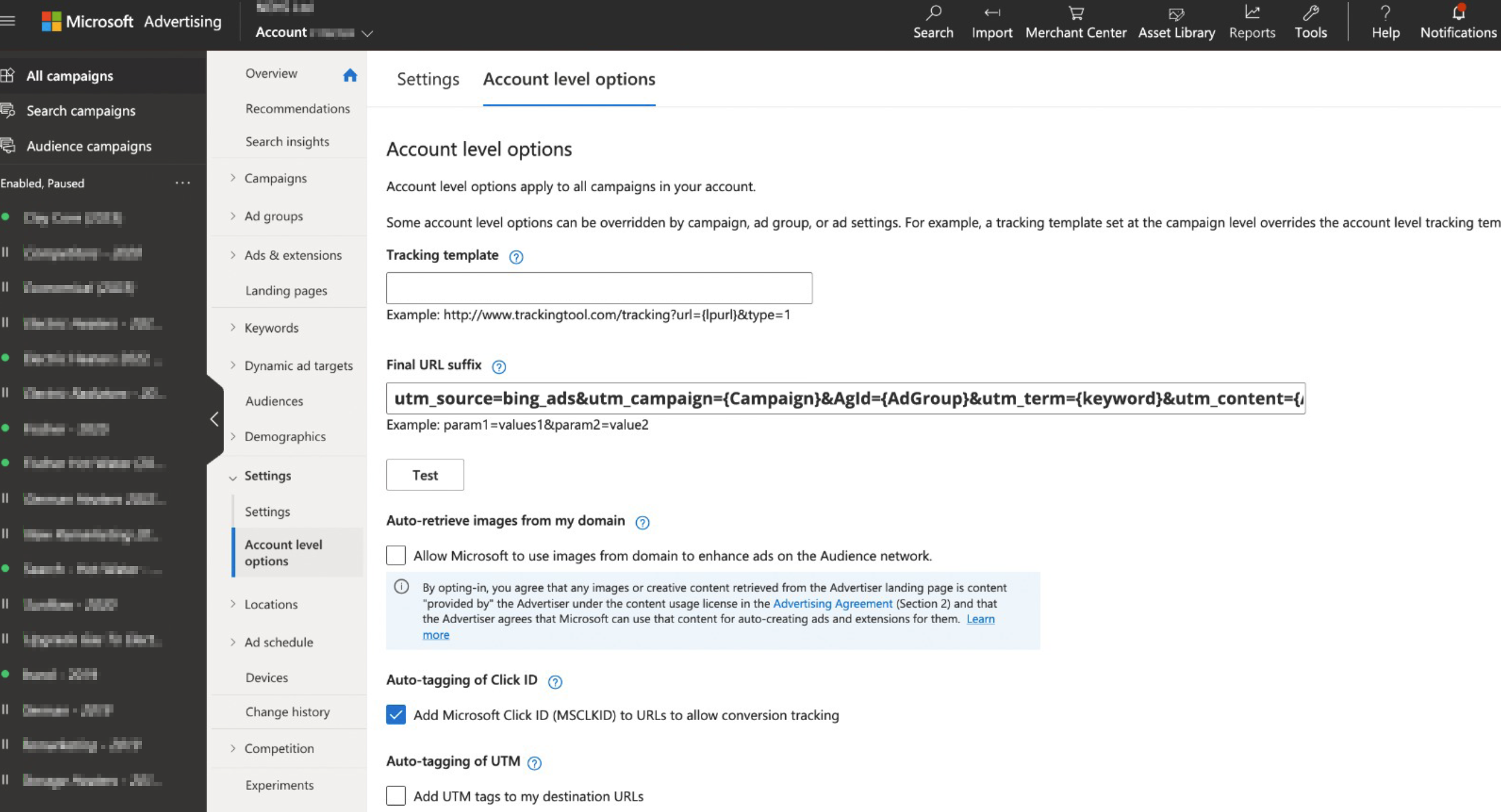
    1. From the collapsible menu on the left of your Microsoft Advertising account, select All campaigns > Settings > Account level options.
    2. Locate the Final URL suffix and insert the following template:
      utm_source=bing_ads&utm_campaign={Campaign}&AgId={AdGroup}&utm_term={keyword}&utm_content={AdId}&device={Device}&GeoLoc={loc_physical_ms}&content_site={Network}&utm_medium=cpc
    3. Select Save.

Final URL suffix location in Microsof Ads account

Maximize Your Advertising ROI with Leader and Dynamic UTM

Unleash the power of Dynamic UTMs to gain a comprehensive understanding of your Microsoft Ads campaigns. Track revenue generated from campaigns, ad groups, and even individual keywords, all within the intuitive Leader platform. Witness the complete customer journey, from click on your ad to business outcome, and optimize your campaigns for maximum ROI.

Unveiling the Power of Dynamic UTM Templates

Let’s delve into the specific data fields that dynamic UTM templates can capture:

  • utm_source: Indicates the source of the traffic, in this case, “bing_ads”
  • utm_campaign: Identifies the specific name of the campaign that triggered your ad.
  • AgId: The name of the ad group that triggered the ad.
  • utm_term: Captures the actual keyword that triggered your ad.
  • utm_content: The numeric ID of the displayed ad.
  • device: Indicates the device used to view the ad. c=desktop, m=mobile, t=tablet.
  • GeoLoc: The geographical location code of the click. For more information on geographical location codes, take a look at this Bing Ads API doc.
  • content_site: The ad network type on which the ad was served: o = owned and operated (Bing, AOL, and Yahoo search results), s = syndicated (search partner site results), a = audience (Microsoft Audience Network placements).
  • utm_medium: Indicates the advertising medium (in this case, “cpc” for cost-per-click)

With dynamic UTM templates in place, you’ll gain a comprehensive understanding of how your Microsoft Ads campaigns are performing, enabling you to optimize your strategies and maximize your return on investment.

Leader 2026 © | Platform for campaign management, lead management and resources for better marketing
Accessibility