
How to Train Google Ads to Bring More Paying Customers, Not Just Leads
Your Google Ads Campaigns May Be Generating Leads. But Are They Bringing You Customers?
Imagine two Google Ads campaigns running for the same business.
Campaign A generates 100 leads at $20 per lead.
Campaign B generates 50 leads at $30 per lead.
At first glance, Campaign A looks like the winner. It delivers twice as many leads at a lower cost.
But what happens when we examine the actual sales?
| Campaign A | Campaign B | |
|---|---|---|
| Advertising spend | $2,000 | $1,500 |
| Leads generated | 100 | 50 |
| Cost per lead | $20 | $30 |
| Paying customers | 4 | 10 |
| Revenue generated | $4,000 | $10,000 |
Illustrative example.
Campaign B generated fewer leads at a higher cost per lead, but delivered more customers and significantly more revenue.
The difference is substantial.
If Google Ads only receives information about new leads, it may not have the full picture of which campaigns are producing valuable business results.
And that’s where a major opportunity begins.
Google Ads AI Is Powerful. But It Needs the Right Signals.
Google Ads uses machine learning to optimize campaigns, analyze signals, and help advertisers achieve their conversion goals.
Its algorithms can evaluate patterns across a wide range of signals and make bidding decisions that would be difficult to manage manually.
But there is an important limitation:
Google can optimize toward the conversions it knows about. It cannot automatically know which of your leads became paying customers.
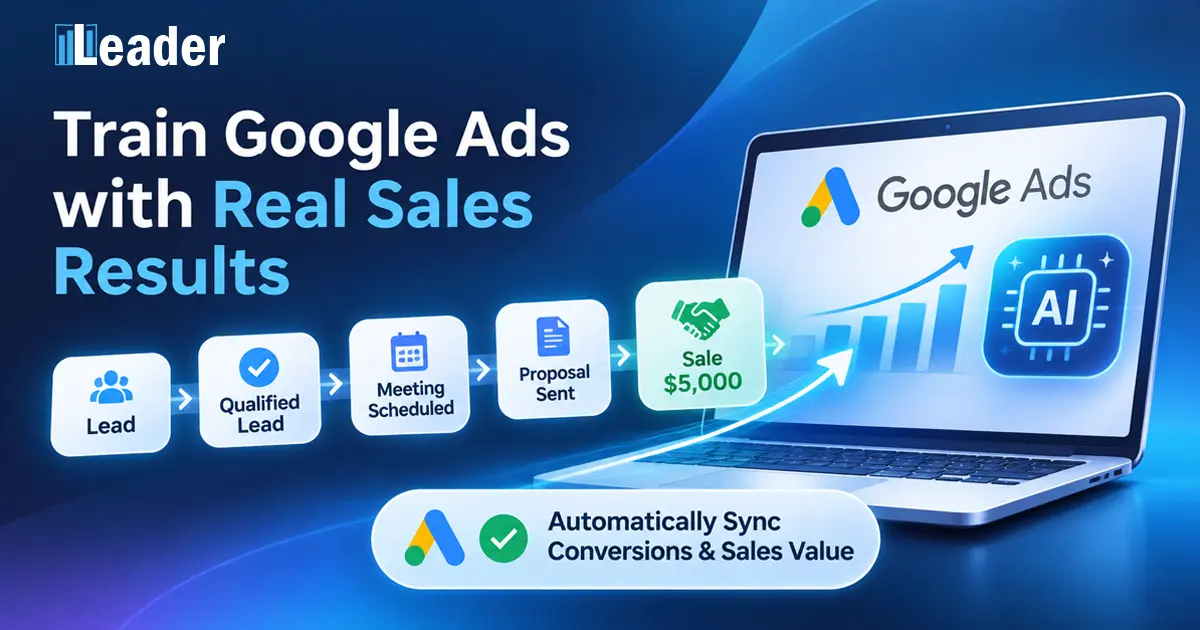
For many businesses, the advertising journey looks like this:
- Someone clicks a Google ad.
- They visit the website.
- They submit a form or make a phone call.
- A new lead is recorded.
- The business contacts the potential customer.
- A meeting takes place, a proposal is sent, or a sale is completed.
Traditional lead conversion tracking often stops at step 3.
Google Ads knows that a lead was generated, but the business continues working with that lead long after the website conversion.
Some leads are irrelevant. Others are genuinely interested. Some become customers, and some generate considerable revenue.
Without connecting these later outcomes to the advertising platform, valuable information remains outside Google’s optimization process.
Not Every Lead Has the Same Business Value
For advertisers, lead quantity is only part of the equation.
A campaign generating many inexpensive leads may appear successful in Google Ads reports, even when the sales team struggles to convert those leads into customers.
Meanwhile, another campaign may attract fewer inquiries but consistently generate qualified prospects and profitable sales.
This is particularly important for businesses where the sale happens after the initial contact, such as professional services, clinics, home improvement companies, B2B businesses, and many other lead-driven industries.
The real question is not simply:
How many leads did we generate?
It is:
Which advertising activities generate qualified opportunities, paying customers, and profitable revenue?
Answering that question can improve human decision-making. Sharing the relevant outcomes with Google Ads creates an additional opportunity: improving the information available to its automated bidding systems.
Teach Google What Happens After the Lead Arrives
Google Ads supports importing conversions that occur after the initial online interaction.
These are commonly referred to as offline conversions, even when the entire sales process happens digitally.
For example, a business can report meaningful events such as:
- Qualified lead: A potential customer meets the business’s qualification criteria.
- Meeting scheduled: A prospect advances to an important stage in the sales process.
- Proposal sent: The business presents a commercial offer to a potential customer.
- Converted lead: A lead becomes a paying customer.
- Completed sale: A transaction is completed, including its actual monetary value.
Google Ads provides official conversion goal categories, including Qualified lead and Converted lead, that help advertisers organize these outcomes.
Other sales milestones can also be mapped to appropriate conversion categories according to the business’s goals.
By connecting these events to the original advertising interactions, Google can gain a better understanding of which campaigns are associated with meaningful business results.
When the appropriate conversion actions are used as bidding goals, this information can help Google’s AI optimize toward outcomes beyond the initial lead submission.
Instead of focusing exclusively on generating more inquiries, advertisers can work toward attracting prospects who are more likely to become customers.
Give Google Meaningful Conversion Values
Not every conversion represents a completed sale, but earlier milestones in the sales process can still carry business value.
For example, a qualified lead, a scheduled meeting, or a proposal may represent a meaningful step toward acquiring a customer.
With Leader, businesses can assign default conversion values to selected sales milestones. These values are sent to Google Ads when the corresponding events occur.
A default value represents the estimated importance of a milestone. It is not actual revenue.
When a lead becomes a paying customer, however, Leader sends the actual transaction value, not an estimated or predefined amount.
Consider two completed sales:
- Customer A purchases a service worth $200.
- Customer B purchases a service worth $5,000.
Both are successful conversions, but their economic value is very different.
When suitable conversion values are provided, supported value-based bidding strategies can take those differences into account.
This does not mean Google automatically knows the profit margin of every transaction. Revenue and profit are not the same thing.
Businesses still need to understand their costs, margins, and profitability.
However, reporting actual transaction values provides a more meaningful signal than treating every completed sale as identical.
The goal is to give Google’s AI better information while keeping business profitability at the center of advertising decisions.
How Leader Connects Sales Results to Google Ads
Leader brings together two complementary capabilities: understanding which advertising activities generate revenue and sending meaningful sales outcomes back to Google Ads.
1. Understand What Actually Generates Revenue
Leader helps businesses and advertising professionals connect leads and sales to their advertising sources.
Instead of evaluating performance only through clicks, impressions, or lead volume, advertisers can examine the revenue associated with specific campaigns, ads, keywords, and other advertising dimensions.
This helps answer practical questions:
- Which campaigns generate paying customers?
- Which keywords bring valuable business opportunities?
- Which advertisements contribute to revenue rather than simply attracting inquiries?
- Where should the advertising budget be increased, reduced, or reconsidered?
By connecting advertising activity to actual sales results, Leader helps advertisers make more informed decisions about budget allocation and profitability.
2. Send Meaningful Sales Outcomes Back to Google Ads
Leader also enables businesses to connect their sales process directly to Google Ads conversion tracking.
A business can select relevant sales milestones, such as qualified leads, scheduled meetings, proposals, or completed sales, and associate them with the appropriate Google Ads conversion categories.
Leader automatically creates the corresponding conversion actions in Google Ads and synchronizes the selected events as leads progress through the sales process.
For intermediate milestones, businesses can define default conversion values.
For completed sales, Leader automatically sends the actual transaction amount.
The business does not need to manually create conversion actions in Google Ads or repeatedly export and upload conversion files.
Leader handles the technical setup and ongoing synchronization, allowing businesses and advertising professionals to focus on managing leads, closing sales, and improving performance.
The result is a continuous connection between the advertising platform and what happens in the business after the initial inquiry.
Let Google’s AI Do What It Does Best
The purpose of sending sales results back to Google Ads is not to replace the advertising professional or eliminate human judgment.
It is to give Google’s optimization systems more relevant information.
Google’s algorithms are designed to process advertising signals at scale and optimize campaigns based on the conversion goals and bidding strategies advertisers configure.
Business owners and advertising professionals, meanwhile, understand aspects of the business that the platform may not know: customer quality, operating costs, sales margins, capacity, and strategic priorities.
These capabilities work best together.
People understand the business. Google’s AI optimizes advertising. Better conversion data helps connect the two.
It is also important to set realistic expectations.
Sending better conversion data does not guarantee more sales or immediate improvements. Results depend on factors such as data quality, conversion volume, attribution, bidding configuration, and the time available for Google’s systems to learn.
Choosing the right conversion goals is essential. Not every sales milestone should automatically become a primary bidding objective, and counting multiple stages of the same sale without a clear strategy can distort performance measurement.
The objective is to provide accurate, meaningful signals that reflect the business’s priorities.
From More Leads to More Profitable Advertising
For years, advertisers have worked to improve click-through rates, reduce cost per click, and generate more leads at lower costs.
These metrics remain useful, but they do not tell the complete story.
A lower cost per lead does not necessarily mean a lower cost per customer.
More conversions do not always mean more revenue.
And higher revenue does not automatically mean higher profit.
A more complete advertising strategy connects three important elements:
- Lead generation: Understand where potential customers come from.
- Sales and revenue measurement: Identify which advertising activities generate actual business results.
- Conversion feedback: Share relevant sales outcomes with Google Ads so automated optimization can use better information.
Leader helps connect these elements, giving advertisers clearer visibility into performance while making it easier to provide Google’s AI with meaningful conversion data.
Better Data, Better Advertising Decisions
Google Ads has powerful technology for finding potential customers.
But businesses hold information that Google cannot fully discover on its own: which leads were qualified, which conversations turned into sales, and how much revenue those sales generated.
Connecting that information creates a more complete advertising process.
The advertiser gains visibility into what is working. Google’s AI receives better signals for optimization. And the business can focus on the outcome that matters most: profitable growth.
Don’t just tell Google that someone became a lead. Help it understand which leads become real customers.
Make Your Advertising Data Work Harder with Leader
Leader connects advertising performance, lead management, and sales results in one platform.
Discover which campaigns, ads, and keywords generate revenue, and automatically synchronize meaningful sales conversions with Google Ads.

